

Electronic calibration modules
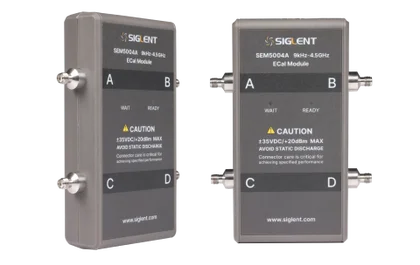
Every calibration standard inside one box, switched electronically. Connect it once over USB, wait for the green light, and the analyser runs the whole calibration itself — in seconds, the same way every time, whoever is doing it. Two and four ports, to 4.5, 9, 13.5 or 26.5 GHz.
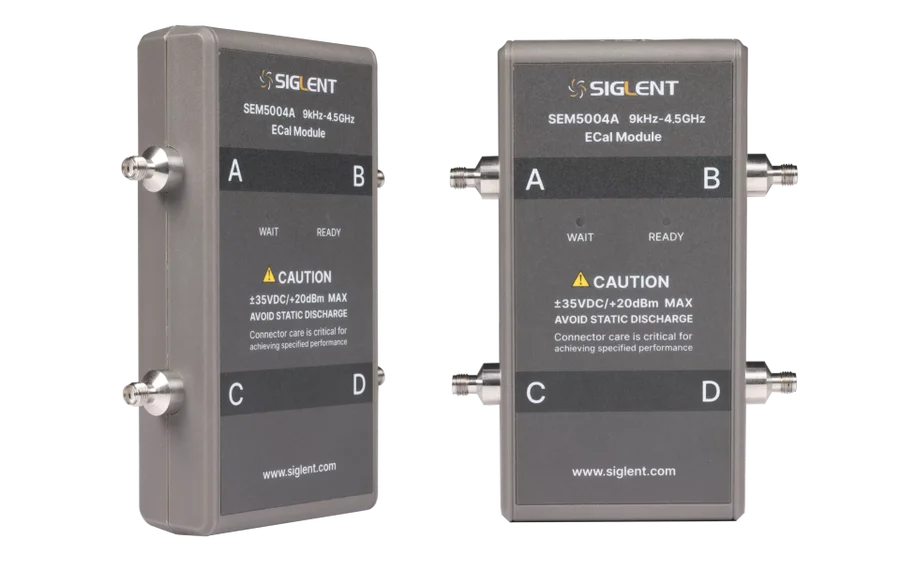
One connection instead of seven
A mechanical calibration asks you to fit an open, a short and a load to each port and then a through between them — seven connections for a two-port measurement, and past a dozen for four ports. Every one of those is a chance to fit the wrong standard, take them out of order, or leave a connector finger-tight, and every one is a mating cycle on a precision test port.
An ECal module holds all of those standards inside one enclosure and switches between them with electronic switches. You connect it to the test ports once, plug in the USB cable, and the analyser recognises the module’s type, frequency range and connector type on its own, then works through every state internally. The sequence cannot be got wrong because there is no sequence for a person to perform.
That is the whole argument, and it gets stronger the more often you calibrate. If a mechanical calibration is a ten-minute job and you do it twice a day, that is over eighty hours across a working year — before counting the connector wear or the measurements quietly spoiled by a calibration nobody noticed was wrong.
1. Connect
Module ports to the analyser test ports, then one USB cable. The USB carries the control and the power — there is no separate supply.
2. It identifies itself
The analyser reads the module’s type, frequency range and connector type automatically. Nothing to select, nothing to type in.
3. Wait for green
WAIT means the module is still reaching operating temperature. READY means its characterisation is valid.
4. Calibrate
The analyser steps through every standard internally. Unplug the USB when you are done.
Which analysers accept an ECal module
From the compatibility table in the SEM5000A Datasheet DS60050_E01A. Several need a firmware minimum — check yours before ordering.
| Analyser series | 2 and 4 port modules | Firmware required |
|---|---|---|
| SNA5000A series | V1.0.0.2.6 or later | |
| SNA5000X series | V1.0.0.2.6 or later | |
| SNA6000A series | — | |
| SVA1000X series | V3.2.2.6.0 or later | |
| SHA800A series | V1.1.2.1.3 or later |
The SSA3000X-R is not on that list. It does vector network analysis and distance-to-fault, but electronic calibration is not among its supported methods — it needs a mechanical kit. The SVA1000X is supported, from firmware V3.2.2.6.0.
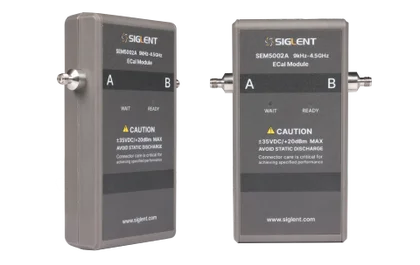
Two-port modules
For two-port analysers. Each one pairs with the analyser of the same frequency — the SEM5002A with the SNA5002A, the SEM5032A with the SNA5032A, and so on.
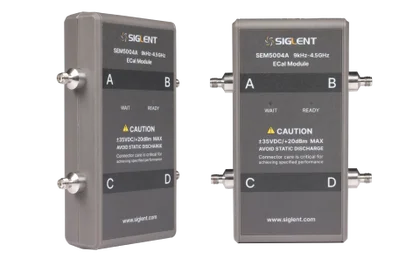
Four-port modules
Where electronic calibration earns its keep. A mechanical four-port calibration is a dozen-plus connections done in the right order; these do it in one operation.
Published residual performance
What is left in the measurement after the correction has been applied — the figures that actually describe how good a calibration is. From the SEM5000A Datasheet DS60050_E01A, measured on an SNA5082X.
| Residual | 9 kHz – 2.5 GHz | 2.5 – 4 GHz | 4 – 6 GHz | 6 – 9 GHz |
|---|---|---|---|---|
| Directivity | 44 dB | 40 dB | 38 dB | 35 dB |
| Source match | 40 dB | 34 dB | 32 dB | 30 dB |
| Reflection tracking | ±0.14 dB | ±0.25 dB | ±0.3 dB | ±0.4 dB |
| Transmission tracking | ±0.12 dB | ±0.17 dB | ±0.20 dB | ±0.23 dB |
| Load match | 33 dB | 32 dB | 33 dB | 30 dB |
Higher directivity and match figures are better; lower tracking figures are better. Above +10 dBm input the calibration degrades relative to these numbers, and the modules are rated to a maximum of +20 dBm input.
All eight compared
The right-hand column gives the analyser each module is the natural match for.
| Model | Ports | Frequency | Connector | Pairs with | Price |
|---|---|---|---|---|---|
| SEM5002A | 2 | 9 kHz – 4.5 GHz | SMA female | SNA5002A | €2,075 |
| SEM5012A | 2 | 9 kHz – 9 GHz | SMA female | SNA5012A | €2,622 |
| SEM5022A | 2 | 100 kHz – 13.5 GHz | 3.5 mm female | SNA5022A | €2,988 |
| SEM5032A | 2 | 100 kHz – 26.5 GHz | 3.5 mm female | SNA5032A | €3,902 |
| SEM5004A | 4 | 9 kHz – 4.5 GHz | SMA female | SNA5004A | €2,458 |
| SEM5014A | 4 | 9 kHz – 9 GHz | SMA female | SNA5014A | €4,286 |
| SEM5024A | 4 | 100 kHz – 13.5 GHz | 3.5 mm female | the 4-port 13.5 GHz SNA6000A models | €6,115 |
| SEM5034A | 4 | 100 kHz – 26.5 GHz | 3.5 mm female | the 4-port 26.5 GHz SNA6000A models | €9,772 |
Prices exclude VAT. The 4.5 GHz and 9 GHz modules are listed here with SMA female connectors (option 030); Siglent also builds them with Type-N 50 Ω female (option 020), and per-port mixed connector combinations are available to order. Ask us if you need a different interface.
General specifications
Control and power over one cable, supplied with the module.
Accuracy degrades above +10 dBm.
Humidity to 75 %, altitude to 3000 m. Storage −20 to +60 °C.
259 g for the 4-port SMA version.
In the box
Quick-start guide, USB 2.0 cable, and an 8.1 mm torque wrench for SMA and 3.5 mm male connectors (0.9 ± 0.04 N·m). Type-N torque wrenches (1.36 ± 0.05 N·m) and additional RF connectors are available separately.
Frequently asked questions
How does an ECal module work?
It holds the calibration standards inside a single box and switches between them electronically. You connect it once, the analyser recognises its type, frequency range and connectors automatically, and it then steps through every state itself. What takes seven separate connections mechanically takes one per port.
Does it need a power supply?
No. A single USB 2.0 cable carries both the control and the power, and it is supplied with the module. Disconnecting the USB cable is how you stop it.
What are the WAIT and READY lights for?
The module has to reach its normal operating temperature before its stored characterisation is valid. Red WAIT means it is still warming; green READY means you can calibrate. Do not calibrate on the red light.
Will it work with my analyser?
The datasheet lists the SNA5000A, SNA5000X, SNA6000A, SVA1000X and SHA800A series — several with a firmware minimum, which is in the table above. Note that the SSA3000X-R is not on that list, so for that analyser you need a mechanical kit.
Two ports or four?
Match it to your analyser. A 4-port module calibrates all four ports in one operation, which is where electronic calibration saves the most time — a mechanical 4-port calibration runs past a dozen connections. A 4-port module on a 2-port analyser is money spent on ports you will not use.
Does an ECal module need calibrating itself?
Yes. Its characterisation data is what the correction relies on, so it needs periodic recalibration exactly as mechanical standards need recharacterisation. Neither option is maintenance-free.
Tell us your analyser and firmware version
Port count and frequency decide the module; the firmware decides whether it will be recognised at all. Send us the model and we will confirm both before you order, and tell you whether the Type-N connector option would suit you better than the SMA one.
Calibrating only occasionally? A mechanical kit costs a fraction as much and may be the sensible choice.