

Siglent USB-GPIB adapter — IEEE 488.2 interface for Siglent instruments


Give a Siglent instrument a GPIB (IEEE 488.2) port through its USB Host socket. Supported models, wiring, VISA resource strings and Python examples.
USB-GPIB adapter
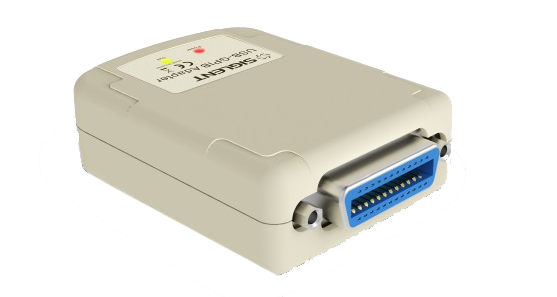
Gives a Siglent instrument a GPIB (IEEE 488) interface through its USB Host port — for benches and test systems that are already wired for GPIB.
Plenty of test racks still run on GPIB: the controller has a GPIB card, the test executive addresses instruments by bus address, and the cabling has been in place for years. A new Siglent instrument normally offers USB and LAN instead. This adapter bridges the two: it plugs into the instrument’s USB Host socket, takes its power from that port, and presents a standard IEEE 488 connector to the bus. The instrument then appears as an ordinary GPIB device at the address you set in its menu — no change to the controller, the drivers or the wiring.
What it does
What it does
Converts the USB Host port of a supported Siglent instrument into a GPIB (IEEE 488.2) port. It is bus-powered from that port, needs no supply of its own, and works in device mode only — the instrument answers a controller; it cannot become one.
What you use it for
Adding a Siglent multimeter, generator, load or analyser to an existing GPIB test system, and keeping legacy software that addresses instruments over GPIB rather than VISA over LAN or USB.
In practice
A production rack built around a GPIB controller loses its 20-year-old multimeter. An SDM3065X replaces it, the adapter goes on its USB Host port, the old bus address is set in the menu — and the test executive keeps running with only the instrument driver changed.
The instrument must have a USB Host port and a GPIB address setting in its menu. ⚠ Siglent’s oscilloscopes are the exception: only the discontinued SDS1000CFL is supported. The SDS1000X, SDS1000X-E and SDS2000X families are explicitly not, and no current SDS series lists USB-GPIB support — use LAN or USB-TMC there. Check your instrument in the table below, and remember that GPIB carries no more than 15 devices with 2 m of cable per device.
Getting it on the bus
Four steps, following Siglent’s own procedure.
1 · Plug it in
The adapter goes into the instrument’s USB Host socket (the type-A one that takes a memory stick), not the USB Device port that goes to a PC. It powers up from that port.
2 · Set the address
In the instrument’s interface menu — on a VNA, System → GPIB — set a bus address that no other device on the bus uses.
3 · Cable the bus
Run a standard IEEE 488 cable to the controller’s GPIB card, or stack it onto the existing chain.
4 · Talk to it
With NI-VISA installed, the instrument appears as a GPIB device in NI-MAX. A *IDN? query confirms the link before you run anything else.
Which instruments it works with
From Siglent’s supported-instrument note, the 2026 selection guide and the individual data sheets.
| Family | Models | Where it is documented |
|---|---|---|
| Digital multimeters | SDM3045X, SDM3055 / -SC, SDM3065X / -SC | Siglent’s supported-instrument list |
| Digital multimeters (newer) | SDM4055A, SDM4065A | Selection guide 2026: “USB Device (optional USB-GPIB adapter)” |
| Waveform generators | SDG1000, SDG1000X, SDG2000X, SDG5000, SDG6000X | Siglent’s supported-instrument list |
| RF signal generators | SSG3000X / -IQE, SSG5000X / -V | Siglent’s supported-instrument list |
| RF signal generators (newer) | SSG6000A | Selection guide 2026: “optional interface: GPIB” |
| Spectrum analysers | SSA3000X, SVA1000X | Siglent’s supported-instrument list |
| Spectrum analysers (newer) | SSA3000X-R | Data sheet: “LAN, USB Device, USB Host (USB-GPIB)” |
| Vector network analysers | SNA5000X-E, SNA6000A | Selection guide and data sheets: “USB Host (USB-GPIB)” |
| DC loads | SDL1000X / X-E | Selection guide 2026: “optional USB-GPIB adapter” |
| Power supplies and SMU | SPD4000X, SPS6000X, SMM3000X | Selection guide 2026: “USB-GPIB module is optional” |
| Oscilloscopes | SDS1000CFL only (discontinued) | Siglent’s supported-instrument list |
SDS1000X, SDS1000X-E and SDS2000X oscilloscopes are named by Siglent as not compatible, and no current SDS series (SDS800X HD, SDS1000X HD, SDS2000X HD/Plus, SDS3000X HD, SDS5000X, SDS6000A/L, SDS7000A) lists USB-GPIB in its data sheet. Those instruments have LAN and USB-TMC.
Talking to it from code
Once NI-VISA sees the instrument, the resource name follows the usual VISA form — GPIB0::<address>::INSTR, where the address is the one set in the instrument’s menu. Nothing else in your code changes: the same SCPI commands work over GPIB, USB-TMC or LAN.
Connect and identify (Python, PyVISA)
import pyvisa

rm = pyvisa.ResourceManager()
print(rm.list_resources())          # ('GPIB0::7::INSTR', ...)

inst = rm.open_resource("GPIB0::7::INSTR")
inst.timeout = 5000                 # ms - raise it for long sweeps
inst.read_termination = "\n"
inst.write_termination = "\n"

print(inst.query("*IDN?"))          # Siglent Technologies,SDM3065X,...

inst.write("*RST")
inst.write("*CLS")
print(inst.query("MEAS:VOLT:DC?"))  # SCPI-99 measurement, e.g. on an SDM multimeter

inst.close()
Log readings to a file
# Log ten readings, one per second, to a CSV file
import csv, time, pyvisa

inst = pyvisa.ResourceManager().open_resource("GPIB0::7::INSTR")
inst.timeout = 10000

with open("log.csv", "w", newline="") as f:
    w = csv.writer(f)
    w.writerow(["seconds", "reading"])
    t0 = time.time()
    for _ in range(10):
        w.writerow([round(time.time() - t0, 3), float(inst.query("READ?"))])
        time.sleep(1)

inst.close()
The commands above are SCPI-99 examples. Each instrument has its own set — take them from its programming guide on our downloads page. LabVIEW, MATLAB and any other VISA-based environment address the adapter the same way.
Where it earns its place
Keeping a production rack alive
An instrument in a GPIB-controlled rack fails and its model is long gone. The Siglent replacement joins the same bus at the same address, so the rack’s wiring, its test executive and its sequence stay as they are; only the instrument driver changes.
Labs where instruments may not join the network
Where IT policy keeps test equipment off the LAN, GPIB remains the sanctioned bus. The adapter lets new instruments in without an IP address, a switch port or a firewall exception.
Mixed-vintage benches
One controller sequencing a GPIB power supply, an older counter and a new Siglent generator: with the adapter they are all on one bus, addressed the same way, in one VISA session — no second interface in the software.
Teaching labs
Course material and lab scripts written around GPIB addressing keep working when the instruments are replaced, which saves rewriting every exercise.
Specification
| Function | USB Host port of the instrument → GPIB (IEEE 488.2) interface |
| Instrument connection | USB, following the USB 2.0 specification |
| Bus connection | Standard IEEE 488 connector, to a controller card or an existing bus chain |
| Mode | Device mode only — the instrument answers a controller and cannot act as one |
| Power | From the instrument’s USB Host port; no separate supply |
| Address | Set in the instrument’s own interface menu |
| Driver | NI-VISA (or another VISA); the instrument shows up in NI-MAX as a GPIB device |
| Commands | The instrument’s normal SCPI set — unchanged from USB or LAN |
| Bus limits (IEEE 488) | Up to 15 devices per bus · 2 m of cable per device · 20 m total |
Questions about the USB-GPIB adapter
Which port does it plug into?
The instrument’s USB Host port — the type-A socket that normally takes a memory stick. The USB Device port, which goes to a PC for USB-TMC, is not used by the adapter.
Does it work with my Siglent oscilloscope?
Almost certainly not. Siglent lists only the discontinued SDS1000CFL, and names the SDS1000X, SDS1000X-E and SDS2000X families as not compatible. No current SDS series lists USB-GPIB support. Control those over LAN or USB-TMC instead.
Can the adapter control other instruments?
No. It is a GPIB device interface, not a controller. Your PC’s GPIB card remains the controller of the bus.
Do I need extra drivers?
Install NI-VISA (or your GPIB card’s VISA) on the PC. No driver is needed on the instrument side; set the GPIB address in its menu and it appears on the bus.
Do my SCPI commands change?
No. GPIB carries the same command set as USB-TMC or LAN. Only the VISA resource string changes, from something like TCPIP0::192.168.1.20::INSTR to GPIB0::7::INSTR.
Is it faster than LAN or USB?
No. GPIB is the slowest of the three. Choose it for compatibility with an existing system, not for throughput; for large waveform or trace transfers, LAN is the better route.
Can I put several Siglent instruments on one bus?
Yes, each with its own adapter and its own address. IEEE 488 allows up to 15 devices, with 2 m of cable per device and 20 m in total.
Which instruments does Siglent officially list?
The list in the table above comes from Siglent’s own note, supported instruments for the USB-GPIB adapter, together with the interface lines in the 2026 selection guide and the individual data sheets. If your model is not there, ask us before ordering.
Not sure your instrument takes it?
Send us the model and firmware version. We will confirm whether it supports the adapter, and which interface to use if it does not.