

Siglent SEM5012A 2-Port ECal Module 9 GHz
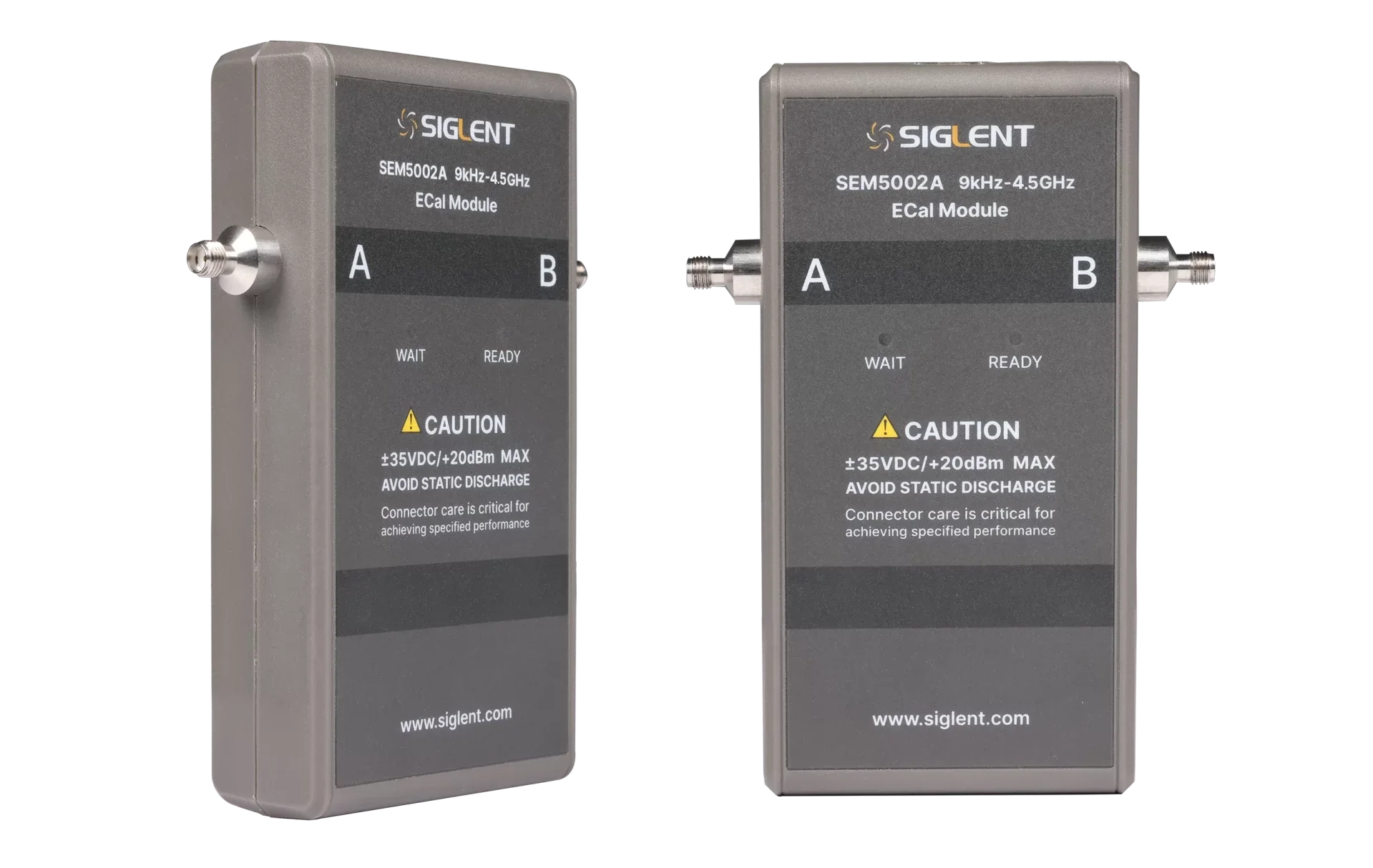
2-port electronic calibration module covering 9 kHz-9 GHz with SMA female connectors. Connect once over USB, wait for the green READY light, and the analyser runs the whole calibration itself — in seconds, the same way every time.
First: choose the connector
This is the one thing that is easy to get wrong on an ECal module, and it cannot be changed afterwards. The module is fixed at the factory with the connectors you order.
The SEM5012A is built with either of these two connector sets. They cost the same list price and are otherwise identical modules — but they are not interchangeable, and the wrong one is useless against your test ports. Choose before you order.
3.5 mm and SMA will screw together; Type-N will not screw to either. 3.5 mm and SMA share the same 1/4-36 thread and do mate, but 3.5 mm is an air-dielectric precision connector specified well beyond SMA’s usable range, and repeatedly mating an ordinary SMA to it wears the precision interface. Type-N is a physically different, larger connector and does not mate with either without an adapter. So the connector you choose has to match the test ports you actually calibrate against — an adapter in the path is one more thing the calibration has to remove.
Selected: SMA female. If your basket does not show a connector option, add a note with your order or ask us to confirm it — we check every ECal order against the VNA it is for.
One connection instead of a dozen
A mechanical calibration kit makes you connect and disconnect open, short, load and thru standards at every port, in sequence. Every one of those connections is a chance to torque something wrong, to mate a worn interface, or to key the wrong standard into the wizard — and every one of them wears the test-port connectors you are trying to protect.
The SEM5012A replaces all of it with one connection per port. The module holds the standards internally and switches between them electronically, under the VNA’s control, over the same USB cable that powers it. The analyser recognises the module, reads its type, frequency range and connector type, and runs the calibration.
2 ports, 9 kHz to 9 GHz. Fewer connections means less time, less wear and fewer opportunities for the kind of error that only shows up later as a measurement you cannot explain.
The full ordering table, so nothing is guessed
Siglent identify the connector configuration by an option code. These are the codes for this module — quote the one you need with your order and there is no ambiguity at either end.
Standard — the same connector on every port
| Connector | Option code | On this model |
|---|---|---|
| 3.5 mm female | 010 | not offered on this model |
| Type-N 50 Ω female | 020 | available on the SEM5012A |
| SMA female | 030 | available on the SEM5012A |
Mixed — a different connector on each port
Any port can be specified independently, and male types are available here that are not offered as an all-ports set. Give one code per port. ⚠ These are built to order rather than stocked, so ask us for a quotation rather than adding to the basket — we will confirm the codes and the lead time before anything is placed.
| Connector | Port A | Port B | Port C | Port D |
|---|---|---|---|---|
| 3.5 mm female | 101 | 201 | — | — |
| 3.5 mm male | 102 | 202 | — | — |
| Type-N 50 Ω female | 103 | 203 | — | — |
| Type-N 50 Ω male | 104 | 204 | — | — |
| SMA female | 105 | 205 | — | — |
| SMA male | 106 | 206 | — | — |
From the SEM5000A datasheet, tables 3-1 and 3-2. A 2-port module uses ports A and B, so only those columns apply.
Performance and specifications
| Residual error | Unit | 9 kHz – 2.5 GHz | 2.5 – 4 GHz | 4 – 6 GHz | 6 – 9 GHz |
|---|---|---|---|---|---|
| Directivity | dB | 44 | 40 | 38 | 35 |
| Source match | dB | 40 | 34 | 32 | 30 |
| Reflection tracking | ± dB | 0.14 | 0.25 | 0.3 | 0.4 |
| Transmission tracking | ± dB | 0.12 | 0.17 | 0.20 | 0.23 |
| Load match | dB | 33 | 32 | 33 | 30 |
Residual errors after calibration, from the SEM5000A datasheet table 8-1. Transmission tracking and load match were measured on an SNA5014A. ⚠ Siglent publish this table only to 9 GHz — there is no equivalent data for the 13.5 GHz and 26.5 GHz modules.
The module is rated to a maximum input of +20 dBm and is protected to ±35 V DC. But the datasheet also notes that above +10 dBm the calibration itself degrades relative to the published residual errors. Survival and accuracy are two different limits — keep the drive below +10 dBm while calibrating.
| Operating temperature | +15 °C to +35 °C |
| Operating humidity | ≤ 75 % (75 % at 40 °C, 24 h) |
| Operating altitude | 0 to 3,000 m |
| Storage temperature | −20 °C to +60 °C |
| Storage humidity | 85 % at 65 °C, 24 h |
| Storage altitude | 0 to 15,000 m |
| Dimensions (W × H × D) | 135.4 × 97.5 × 31.0 mm |
| Weight | 259 g (measured on a 4-port SMA female module) |
| Maximum input power | +20 dBm |
| Maximum protection DC voltage | ±35 V |
| Interface, power and control | USB 2.0 — powered by the VNA, no mains supply |
The specified operating window is +15 °C to +35 °C at no more than 75 % relative humidity — noticeably tighter than the instruments it calibrates. An ECal module used in an unheated workshop is outside its specification, and the residual errors above no longer apply.
Which analysers it works with
The module is powered and controlled entirely over USB from the VNA, so there is nothing to configure — but the analyser needs firmware new enough to recognise it.
| Analyser | SEM5012A | Interface | Minimum firmware |
|---|---|---|---|
| SNA5000A | Yes | USB | firmware after V1.0.0.2.6 |
| SVA1000X | Yes | USB | firmware after V3.2.2.6.0 |
| SHA850A | Yes | USB | firmware after V1.1.2.1.3 |
⚠ The datasheet is not self-consistent here, so please confirm with us before ordering. Its opening section also names the SNA5000X and SNA6000A series, but neither appears in the compatibility table above. The table’s four-port column is also headed only “5004A / 5014A”, which leaves the 13.5 GHz and 26.5 GHz four-port modules unlisted. We would rather check your exact VNA model and firmware than have you receive a module that will not be recognised.
In the box, and what else you may need
Supplied
| Quick-start guide | 1 |
| USB 2.0 cable | 1 |
| Torque wrench, 8.1 mm | 1 |
The supplied 8.1 mm torque wrench is for SMA and 3.5 mm male connectors, set to 0.9 ± 0.04 N·m. ⚠ If you order the module with Type-N connectors it is the wrong wrench — Type-N needs 1.36 ± 0.05 N·m, and that wrench is an optional accessory.
Optional accessories
| Item | For | Torque |
|---|---|---|
| Torque wrench, 19.1 mm | Type-N | 1.36 ± 0.05 N·m |
| Torque wrench, 20.1 mm | Type-N | 1.36 ± 0.05 N·m |
| RF connector: SMA male | — | — |
| RF connector: 3.5 mm male | — | — |
| RF connector: Type-N 50 Ω female | — | — |
| RF connector: Type-N 50 Ω male | — | — |
Adapters and spare connectors are ordered separately — tell us what you are mating to and we will list what you need.
Using it
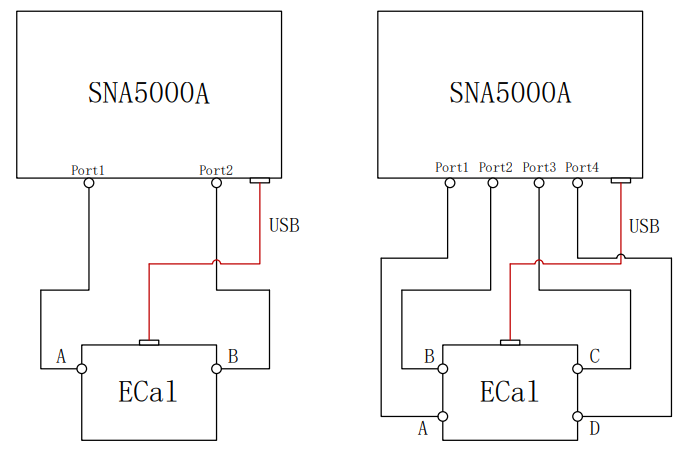
- Connect the module’s ports to the analyser’s test ports — ports A and B.
- Plug in the USB cable. The VNA powers the module and automatically reads its type, frequency range and connector type.
- Wait for green. A red WAIT lamp means the module has not reached its working temperature yet. Calibrating before the green READY lamp appears is the commonest way to get a bad calibration from a good module.
- Run the calibration from the analyser. When it finishes, unplug the USB first, then the RF connections.
Use the torque wrench every time. The front panel itself says it: connector care is critical for achieving specified performance. An ECal module is a transfer standard — its accuracy lives in its connectors, and an over-torqued interface never recovers.
The whole SEM5000A range
Eight modules: two port counts × four frequency bands. Note where the connector choice exists and where it does not.
| Model | Ports | Frequency | Standard connectors | Price ex VAT |
|---|---|---|---|---|
| SEM5002A | 2 | 9 kHz – 4.5 GHz | SMA female or Type-N 50 Ω female | €2,075 |
| SEM5012A | 2 | 9 kHz – 9 GHz | SMA female or Type-N 50 Ω female | €2,622 |
| SEM5022A | 2 | 100 kHz – 13.5 GHz | 3.5 mm female | €2,988 |
| SEM5032A | 2 | 100 kHz – 26.5 GHz | 3.5 mm female | €3,902 |
| SEM5004A | 4 | 9 kHz – 4.5 GHz | SMA female or Type-N 50 Ω female | €2,458 |
| SEM5014A | 4 | 9 kHz – 9 GHz | SMA female or Type-N 50 Ω female | €4,286 |
| SEM5024A | 4 | 100 kHz – 13.5 GHz | 3.5 mm female | €6,115 |
| SEM5034A | 4 | 100 kHz – 26.5 GHz | 3.5 mm female | €9,772 |
Prices from Siglent’s Annex 1 price list 2026_1, ex VAT. Every module in the range can also be built with mixed or male connectors to order.
Documentation
SEM5000A datasheet
PDF · DS60050_E01A
Every figure on this page comes from it: the connector option tables, the residual-error data, the compatibility list, the environmental limits and the accessory list.
Calibration kits
If a mechanical kit suits you better — lower cost, no USB, no warm-up, and no firmware dependency — we stock the full range of Siglent mechanical calibration kits too.
See the mechanical calibration kits →Questions
Which connector should I order, SMA or Type-N?
Match the test ports you calibrate against. If your VNA and fixtures are SMA or 3.5 mm, take the SMA female version (option 030). If you work in Type-N — common on lower-frequency and higher-power setups — take Type-N female (option 020). They cost the same, and it cannot be changed after the module is built. If in doubt, tell us the analyser model and we will confirm.
Will 3.5 mm mate with my SMA ports?
Mechanically yes — they share the same 1/4-36 thread. But 3.5 mm is an air-dielectric precision connector and repeatedly mating ordinary SMA to it wears the precision interface, which is the part carrying your calibration accuracy. It works; it is not free. Type-N does not mate with either without an adapter.
Does it need a power supply?
No. The module is powered and controlled entirely over the USB cable from the analyser. There is no mains adaptor and nothing to configure.
Why is there a red light when I plug it in?
That is the WAIT indicator: the module has not reached its working temperature. Wait for the green READY lamp before calibrating — the published residual errors assume a warmed-up module.
What is the maximum power I can put into it?
It is rated to +20 dBm and protected to ±35 V DC. ⚠ But the datasheet also notes that above +10 dBm the calibration degrades relative to the published figures. Keep the drive below +10 dBm while calibrating.
Does it work with my analyser?
Siglent’s compatibility table lists the SNA5000A, SVA1000X and SHA850A, each with a minimum firmware version. ⚠ The same datasheet’s opening section also names the SNA5000X and SNA6000A series, which do not appear in that table — so please confirm your exact model and firmware with us before ordering.
Why an ECal module instead of a mechanical calibration kit?
Time and repeatability. A mechanical kit needs open, short, load and thru standards connected in sequence at every port; the ECal needs one connection per port and switches its standards internally. Fewer connections means less wear on the test ports, less time, and far fewer chances to make an error you will not notice until the measurement looks strange.
What temperature does it need?
+15 °C to +35 °C at no more than 75 % relative humidity. That is tighter than most of the instruments it calibrates — outside that window the specified residual errors no longer apply.
Check the connector before you order
Tell us which analyser you are calibrating and which connectors your test ports use, and we will confirm the right option code before anything is ordered. The module is built with the connectors you specify and cannot be changed afterwards, so it is worth a two-minute conversation. We are the official Siglent distributor for the European Union and we ship from the Netherlands.