

Siglent SNA6000-GC gain compression measurement option (software)
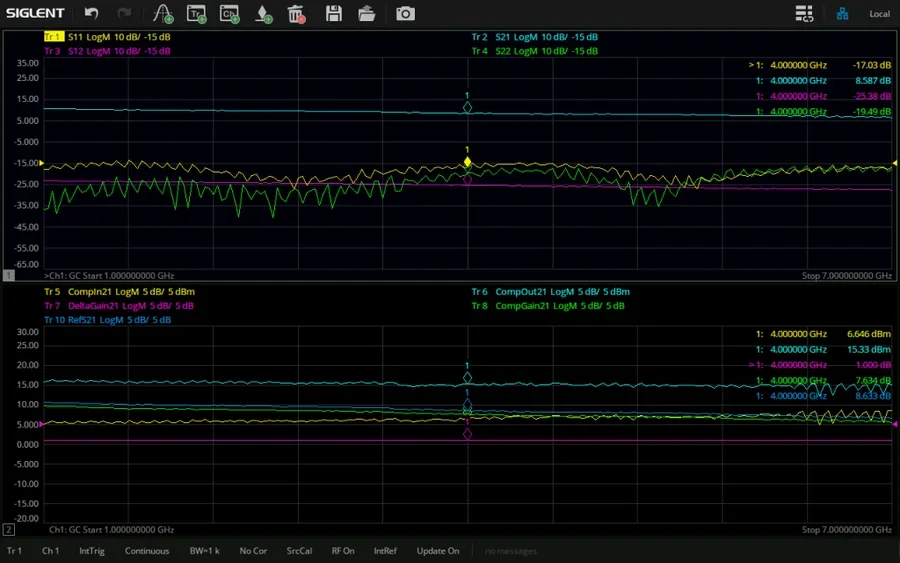
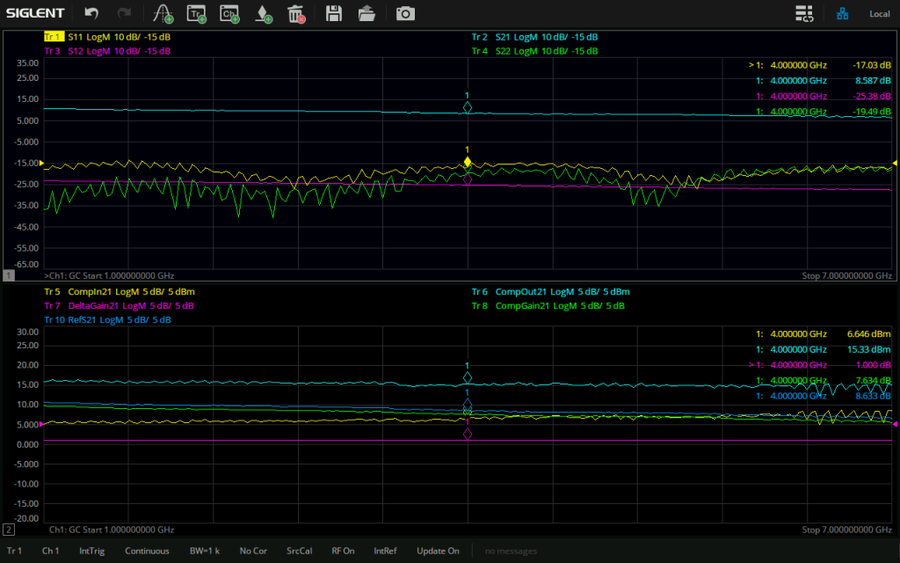
Gain-compression measurement for the SNA6000A VNA: P1dB input and output power and gain across the band by SMART or 2-D sweep, five compression methods.
SNA6000-GC — gain compression measurement
Finds an amplifier’s compression point across its whole band in one measurement: input and output power at compression, compressed and linear gain, by SMART sweep or two-dimensional power and frequency sweeps.
An amplifier’s gain is flat until the input drives it towards saturation; the 1 dB compression point is the input power at which the gain has dropped 1 dB from its linear value. Measuring it by hand means a power sweep at every frequency of interest. The GC option makes it a channel type: set the frequency range, the linear input power and the compression level, and the analyser searches for the compression point at every frequency and plots the result as traces.
What this option does
What it does
Adds the Gain Compression measurement mode with its own setup dialog: frequency and power tabs, three acquisition modes, five compression definitions, and traces for the linear S-parameters and the compression parameters.
What you use it for
Characterising power and driver amplifiers, gain blocks and front-end modules: P1dB over frequency, the output power available at compression, and how far the device is from its linear region at a given drive.
In practice
A 2–6 GHz driver amplifier is specified at +20 dBm P1dB. One SMART sweep shows CompOut21 holding +21 dBm to 5 GHz and sagging to +18.5 dBm at the band edge — the figure that goes in the data sheet, with the input power that produced it.
The analyser has to drive the amplifier into compression: the SNA6000A source range is −55 to +10 dBm, so devices that need more input than that require an external driver stage. Keep the amplifier’s output within the port’s maximum input level with an attenuator. For absolute power figures run the GC calibration wizard — a source-power calibration with a power meter followed by a 2-port calibration — and use a compression method that suits the gain curve: amplifiers with non-monotonic gain are better measured from saturation than from maximum gain.
What is in the gain-compression application
SMART sweep
Iterative power search at each frequency — usually the fastest and most accurate way to find the compression point; iteration count and hit percentage shown live.
Power per frequency (2-D)
Steps the input power from start to stop at every frequency.
Frequency per power (2-D)
Sweeps frequency at each power level; spreads the heating across the band.
Five compression definitions
From linear gain, from maximum gain, from saturation, from back-off, and X/Y compression.
Compression traces
CompIn21, CompOut21, CompGain21, CompS11, RefS21 and DeltaGain21 alongside the linear S11, S21, S12 and S22.
Port and power settings
Input and output port, linear input power, reverse power and the compression level and tolerance.
GC calibration
Source-power calibration with a power meter plus 2-port calibration, in one wizard.
Linear or log frequency
Sweep type, points, range and IF bandwidth set in the frequency tab.
Specification
From the SNA6000A data sheet and user manual.
| Measurement mode | Meas → Mode → Gain Compression, in the active or a new channel |
| Linear S-parameters | S11 input match · S21 gain · S12 reverse isolation · S22 output match |
| Compression parameters | CompIn21 (input power at compression) · CompOut21 (output power) · CompGain21 · CompS11 · RefS21 (linear gain reference) · DeltaGain21 |
| Acquisition modes | SMART sweep · sweep power per frequency (2-D) · sweep frequency per power (2-D) |
| Compression methods | From linear gain · from maximum gain · from saturation · from back-off · X/Y |
| Calibration | GC calibration wizard: source-power calibration (power meter) then 2-port calibration |
| Source power range | −55 to +10 dBm (standard setting range); external driver for higher drive |
| Models | All eight SNA6000A models |
Compatibility and activation
Works on all eight SNA6000A models; the 4-port models can keep two amplifiers connected and switch between them.
Supplied as a licence key issued against the analyser’s serial number — nothing to fit and nothing to return. Enter it under System → Options → License…, or load the .lic file from a USB stick. Ordered together with a new SNA6000A, Siglent activates it at the factory.
Goes with
Questions about SNA6000-GC
Can I not just do a power sweep?
A standard power sweep shows gain versus input power at one frequency. GC automates the search at every frequency in the band and returns the compression parameters as traces, with the compression level you define.
Which compression method should I use?
From linear gain for a well-behaved amplifier; from maximum gain or from saturation when the gain curve has a peak or is non-monotonic; back-off and X/Y when a specification defines the point that way.
Is only 1 dB compression possible?
No. The compression level is a parameter, so 0.1 dB, 1 dB or 3 dB points can be measured.
Do I need a power meter?
For calibrated absolute power yes: the GC calibration wizard starts with a source-power calibration. Without it the analyser uses its factory source accuracy.
What if my amplifier needs more than +10 dBm drive?
Add an external driver amplifier between the source port and the device, and include it in the source-power calibration.
How is the licence delivered?
Supplied as a licence key issued against the analyser’s serial number — nothing to fit and nothing to return. Enter it under System → Options → License…, or load the .lic file from a USB stick. Ordered together with a new SNA6000A, Siglent activates it at the factory. Add the analyser’s serial number to your order, or send it to us afterwards.
Can I return a licence?
Software licences and activation keys are delivered electronically and are excluded from the 14-day EU return right once the key has been issued. If you are unsure, ask us first.
Planning an SNA6000A measurement?
Tell us the device, the frequency range and what you need to measure. We will confirm the model, the options and the calibration you need before you order.